Use this explanation alongside Privacy & Data > Consent in the site admin. It helps you understand the visitor choices and collection rules shown there. Read Subprocessors on the account site for the list of data processing partners.
Checked against the product’s code on 7 November 2026.
Praxis resolves consent for analytics, personalization and marketing separately. Personalization includes A/B testing. Essential sign in and access functions sit outside those purpose switches.
It describes settings and defaults, rather than certifying that a site’s chosen policy meets its legal obligations.
How a request is decided
Section titled “How a request is decided”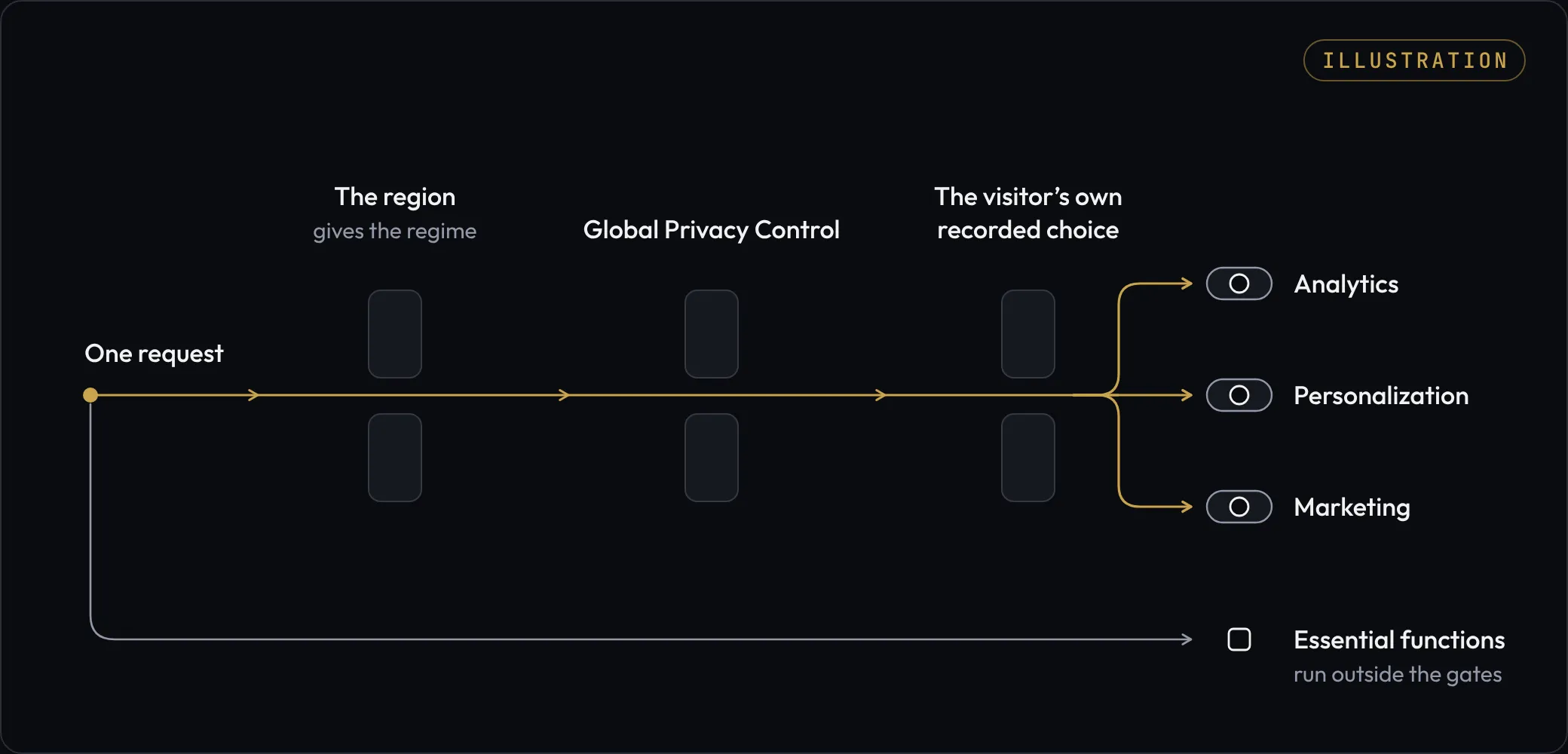
For each purpose, the order of authority is:
- A Global Privacy Control signal refuses the purpose.
- Otherwise, a saved visitor choice applies.
- Otherwise, the site’s regional default applies.
A saved choice can override the regional default in either direction. Global Privacy Control overrides both.
The default map
Section titled “The default map”| Location | Default regime | Before a saved choice |
|---|---|---|
| The EU countries, United Kingdom, Switzerland, Iceland, Liechtenstein and Norway | Opt in | Analytics, personalization and marketing are off. |
| United States | Opt out | Analytics and personalization are on. Marketing is off. |
| Any unlisted country or unknown location | Opt in | All three purposes are off. |
This is the shipped default map, not a statement of the law in each place. An Admin can ask the copilot to change the site’s policy with approval. A region entry such as US-CA takes precedence over a country entry such as US. A policy can also force one regime for every visitor.
Essential only sets all three defaults to off. In the current consent handling it does not replace a saved grant. Do not use its name as an assurance that all earlier choices have been cancelled.
What visitors see
Section titled “What visitors see”Accept all grants what the banner names, and the banner names marketing only on a page that declares English and only on a site that shares. A site that shares nothing keeps the analytics and personalization choice. Visitors can refuse all three purposes with Decline, or open Privacy choices to choose each purpose separately.
An undecided visitor in an opt out region gets a notice when a purpose is active, with Privacy choices and OK. Dismissing the notice is separate from saving purpose choices.
Privacy choices opens these switches:
- Analytics, including arrival page, referring site, campaign tags and advertising click identifiers.
- Personalization & A/B.
- Marketing / data sharing.
The visitor chooses Save choices to record them. The reopen control is a footer link on pages with a marked Praxis footer, or a small corner icon on other pages. The essential only regime does not show this reopen control.
A Do Not Sell or Share My Personal Information link is shown under opt out when the site’s settings indicate selling or sharing.
In supported browsers, JavaScript keeps the notice and choices separate from the page’s custom CSS. Privacy choices can fall back to a corner icon if its footer link is hidden or unreadable. Without JavaScript, the notice says “These buttons need JavaScript, which is not running on this page.”
The full opt in banner appears only before a recorded choice. With no saved choice, opt out shows a smaller notice only while at least one purpose is active. An essential only policy shows neither. Check the consent policy; use Privacy choices when offered to reopen the choices. If a notice is still missing when expected, contact support with the page address.
On a slow connection, supported browsers wait for the banner or notice’s text and buttons before drawing it. Broken page markup can keep the earlier rendering.
Global Privacy Control and cookies
Section titled “Global Privacy Control and cookies”A cookie is a small value stored by the browser and sent with requests to the site.
The server treats Sec-GPC: 1 as a refusal for all three purposes that need a consent decision. A grant submitted under that signal is stored as a refusal.
Under opt in, Praxis does not issue a new persistent visitor identity until analytics or personalization has been explicitly allowed. Under opt out, the identity can be created when a page is served, when you make a choice or on the first recorded page view, unless the visitor sends Global Privacy Control or has refused both analytics and personalization. When issued, the __em_vid identity cookie is Secure and HttpOnly. The separate __em_consent cookie is readable by the consent runtime so a refusal can be remembered even without a visitor identity.
Both cookies last one year.
After a consent choice, the answer that page scripts can read contains no visitor id. The live channel check says whether this browser has an identity without printing any part of it. The identity cookie is still sent to the browser with HttpOnly protection; this change does not remove it.
Essential customer sign in is separate. A visitor who refuses personalization still keeps access to content they bought when signed in.
Tags added by your team
Section titled “Tags added by your team”In Privacy & Data → Consent, the Head & CSP tab manages site head entries and Content Security Policy. A head entry can wait for a chosen consent purpose. An entry deliberately set to load before consent does not wait for consent just because the notice is present.
Review the behavior of every tag you add. The platform exposes the visitor’s current consent to integrations, but that does not prove that every tag from another service honors it.
Find and export visitor data
Section titled “Find and export visitor data”An Admin can inspect visitor data:
- Open Privacy & Data.
- Open Visitor Data.
- Search by email, user ID, visitor ID or person ID.
- Open the intended browser record.
The record has Overview, Journey, Identity, Interests and audiences, Decisions, Data held and Erase tabs. Export this visitor’s data prepares an export for that person through an approval card. Read the linked browsers and scope on that card before proceeding. Follow the visitor export task for its steps and complete download.
For a site export, open Privacy & Data → Exports. Follow Exports, schedules and retention for selecting the range, reviewing the datasets and downloading the completed run.
The export datasets cover events, decisions, goals, audience transitions, audiences, profiles, consent and daily rollups. Files use compressed NDJSON files, a format with one data record per line, and an inventory of the exported files. They go to platform storage under the site’s own path. Scheduled exports require the feature to be enabled for the account.
Erase visitor data
Section titled “Erase visitor data”Erasure requires approval and has no undo. It removes the visitor profile, traits, consent records, interests, memberships and event history in its scope. Some reporting rows are kept without the visitor identity. Orders and payments remain, with the visitor reference removed; an order keeps the customer name and email recorded at checkout. Visitor erasure does not remove form submissions. Erase those separately from the form’s submissions.
Read the receipt for the result of reset of live state and export cleanup. Those steps can report a partial result even after the site’s data has been erased. Export files already downloaded cannot be recalled. Arrange cleanup of copies held in your own systems. Use the browser erasure task to review the exact scope before approval.
Retention
Section titled “Retention”Visitor events are kept with no limit until you set a retention period. Once you set one, events older than it are deleted on the site’s regular scheduled run, but only after an archive export has covered them.
The setting covers eligible captured events. It does not set a deletion period for decision records, other visitor data or archive copies. Visitor erasure remains a separate action.
Your next step
Section titled “Your next step”Follow Consent policy and visitor data to inspect your site’s policy or handle a browser record.